|

|

|
      
|

|
LCoS Technology LCoS is the newest display technology to use Liquid Crystal for controlling pixel brightness in an image. The most common forms of Liquid Crystal technology are found in the large amorphous silicon LCD panels that are used in direct-view computer monitors, TVs and HDTVs. They typically range in size from 5 inches up to 100 inches (the record holder as of March 2006). Next are the much smaller high temperature polysilicon panels used in video and data projectors. They are only about 1 inch in size and are found in all large screen LCD rear projection TVs and HDTVs. In both of these technologies the light source is behind the panel and light has to travel completely through it, back to front, including through all of the electronic circuitry and components within the panel that are needed to control the individual pixels. These block a lot of the light and create gaps between the pixels. The higher the resolution the greater this problem becomes. A second major issue is that the Liquid Crystal needs to be relatively thick in order to deliver high contrast. That slows its response time, which leads to some smearing when there is motion or change in the image.
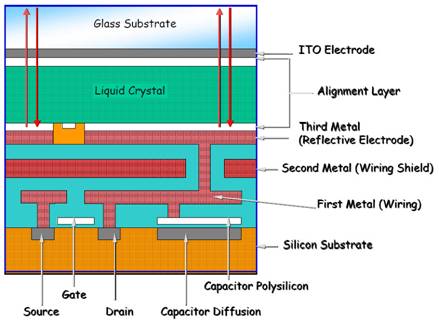
The principle behind LCoS is the use of a mirror on the backside of the Liquid Crystal layer so that the light comes in from the front, travels through the Liquid Crystal once, bounces off the mirror, and then travels through it a second time on its way to the screen. This requires some slightly more complex optics, but works really well. It has several immediately obvious advantages: all of the electronics lie behind the mirror, where they’re completely out of the way. There is also lots of room back there so it’s possible to go up to incredibly high resolutions, and LCoS already produces the highest resolution devices of all the display technologies. Because light goes through the Liquid Crystal twice it can deliver high contrast and still be quite thin, which dramatically improves response time and reduces smearing considerably. We’ll discuss the relative advantages and disadvantages of LCoS in Parts C and D.
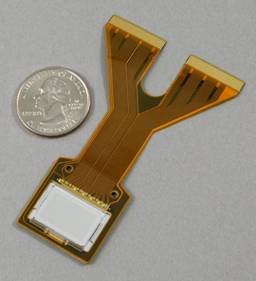
So how does it work? Liquid Crystal can rotate the polarization of light, and the amount of rotation can be controlled by an electric field. The electric field for each pixel is produced by a silicon chip behind the mirror. Actually, the mirror is the top layer of the silicon chip and the Liquid Crystal is placed directly on top of the mirror – so that’s why it’s called Liquid Crystal on Silicon. Most panels are about three quarters of an inch in size. Figure 2a shows a photograph of an LCoS panel. To produce an image a polarized light source is focused on the panel. The brightness of each pixel is controlled by varying the electric field at its location. This rotates the local light polarization and then a polarizing filter is used to block the portion that’s been rotated. The silicon chip that is generating the electric fields actually works very much like a computer memory chip and is organized into rows and columns of pixels. Each pixel is addressed as a memory location. A cross section diagram of an LCoS panel is shown in Figure 2b.
Just as with all of the other display technologies each manufacturer has their own proprietary implementation and all give their version a unique marketing name, which are listed in Tables 1 and 2. All of the manufacturers make a point of mentioning that they use a Vertically Aligned Neumatic Liquid Crystal with an inorganic alignment layer. The vertical alignment increases the contrast and also makes the screen naturally black when the drive signal is zero. The inorganic alignment layer eliminates the aging problems that arose with the earlier organic alignment layers, so all of these LCoS technologies now have very long lifetimes.
Table 2 lists the specifications supplied by each manufacturer for their higher technology 1080 LCoS panels. For completeness we have included information from Sony and SpatiaLight, which did not participate in the Shoot-Out. There are two entries for Sony: their first generation panels in the Qualia 004 and 006 products and their second generation panels in the XBR products announced in August 2005.
Table 2 : Specifications for 1920×1080 LCoS Panels
The Panel Contrast Ratio is probably the most critical value in the table because the Contrast Ratio at the screen of an HDTV is always less than the panel’s value. The Pixel Pitch is the center-to-center spacing for pixels in the panel and the Inter-Pixel Gap is the inactive space between them. The Fill Factor, sometimes called the Aperture Ratio, is the percentage of the pixel area that is active, which is close to 100 percent, so the gaps between the pixels on the screen are generally not noticeable. The Fill Factor is up to a few percentage points greater than for DLP microdisplays, but high temperature polysilicon LCD projector panels typically have much smaller values in the range of 50 to 70 percent, so their pixel structure is often noticeable. The Lifetime figure includes many factors, but can only be statistically estimated through extrapolation of laboratory testing. All of the supplied values are greater than 100,000 hours, which is more than 11 years running continuously 24 hours per day. Of greatest concern is the loss of brightness or contrast over time, which is called aging and can lead to what is commonly called image burn-in. All of the manufactures stated that aging and burn-in do not occur with their inorganic alignment layer. Signal Level refers to the number data bits used for controlling the LCoS device in the Panel Board. The greater the number of bits used the smoother the gray-scale and the less likely that false contouring will be visible.
The Response Time is an industry standard that specifies the total time that it takes a pixel to make a transition from black to white, the Rise Time or Ton, plus the time to make a transition from white to black, the Fall Time or Toff. Response Time is one measure of how quickly the image can be changed and provides some indication of the likelihood of visible motion smear in moving images. In general, the smaller the better, but there are many factors that are involved with motion smear. Unfortunately, some manufacturers are publishing a Response Time that is the average of the rise and fall times instead of their sum. This makes them appear to be twice as fast as they really are. So be very cautious with Response Time specifications – make sure you know which method the manufacturer is using. (As an example: Sony’s Qualia SXRD panels specify the total time, 5 ms, for the Response Time specification, but the latest XBR SXRD panels use the average, 2.5 ms, for the Response Time, so they appear to be twice as fast, when they’re not.) We have listed both the Rise and Fall Times in the Table to help clarify this issue.
The physical process that controls the brightness of each pixel is actually analog for LCoS and all other Liquid Crystal based technologies. This is an advantage because human vision is also an analog process as well. This eliminates the dithering artifacts that accompany fully digital display technologies like DLP and Plasma (See Part III, Part IV and Part D). However, it’s actually possible to design the panel’s silicon backplane to run with either an analog voltage or Pulse Width Modulation, PWM, which is a digital signal. The end result is still an analog response of the Liquid Crystal but it’s done in two entirely different ways and they each have their own advantages and disadvantages, which we’ll discuss later. (The digital method is similar to how the lowly light dimmer controls an analog tungsten lamp by using electrical pulses.) The Device Control entry in Tables 1 and 2 lists the method each unit uses. Digital backplanes generally have a higher yield and are therefore cheaper to manufacturer (but not all of the manufacturers agree with this statement), plus the associated drive electronics are also cheaper. However, it’s currently harder to get a smooth gray-scale with digital control (particularly at the dark-end of the gray-scale), so that’s why most units use analog backplanes.
Figure 2a
Figure 2b
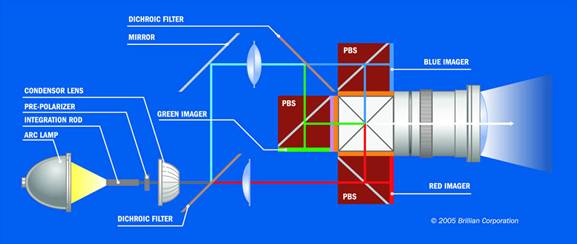
Figure 2c
Caption: Figure 2. (a) LCoS D-ILA panel photograph. Courtesy JVC. (b) LCoS D-ILA panel cross section diagram. Courtesy JVC Professional Products. (c) Projection Light Engine. Courtesy Brillian Corporation.
Optics and Electronics There are a number of other critical components in an LCoS HDTV besides the panels. The Projection Light Engine, which contains all of the optics from the lamp to the projection lens, first prepares the light beams that illuminate the tiny LCoS panels, and then magnifies the images by a linear scale factor of about 80 to one, which is 6,400 to one in area (for a typical 60 inch diagonal screen). The technology involved is no less amazing than the LCoS panels themselves and is just as important to the image and picture quality you see on the screen. It’s generally the single most expensive component in any projection HDTV. Figure 2c shows a diagram of a Projection Light Engine. Note that all of these HDTVs use 3 LCoS panels, one for each of the red, green and blue primary color channels. Filters first split the light into the 3 primary color components for the LCoS panels, and then a set of prisms is used to recombine the primary colors back into a single beam just ahead of the projection lens. The screen itself is another major component in the optical system. It also has a critical impact on image and picture quality and the good ones are quite expensive. There are two other important optical components: the very black interior space between the projection lens and screen that absorbs spurious light and a front-surface flat mirror at the back of the cabinet that redirects the light path from the projection lens forward to the screen.
There are two main electronic component assemblies that we will also be discussing frequently: the Panel Board, which is responsible for the low-level direct control of the LCoS panels, and the Front-End Board, which has all of the input connectors for the HDTV. It converts all of the various input signals (Composite Video, S-Video, Component Video, RGB, DVI and HDMI) into the digital format required by the Panel Board. It also manages the On Screen Menus that implement the user and service adjustments and controls. The Panel Board generally has only factory accessible controls, including the low-level device gamma tables needed to control the LCoS panels.
What’s Coming Next In Part B we'll start with a discussion of How We Tested and then examine the photometry and colorimetry of the units in detail, which provides a quantitative assessment of their color and gray-scale accuracy. In Part C we'll continue with a revealing Test Pattern analysis, followed by a description of the extensive Jury Panel testing and then provide individual Assessments for each of the units, including Jury evaluations and comments. Part D will have an overall Assessment of LCoS technology, followed by detailed technical performance comparisons between all of the major display technologies: CRT, LCD, Plasma, DLP, and LCoS, and we’ll finish with a discussion of the most exciting new developments in display technology that will be the subject of future articles in this series.
Article Links Part A: Introduction to LCoS Technology Part B: LCoS Color and Gray-Scale Accuracy Part C: Test Pattern and Jury Panel Evaluations Part D: Comparison with CRT, LCD, Plasma and DLP
Sidebar: LCoS HDTV Manufacturers Sidebar: Shoot-Out Hardware and Software
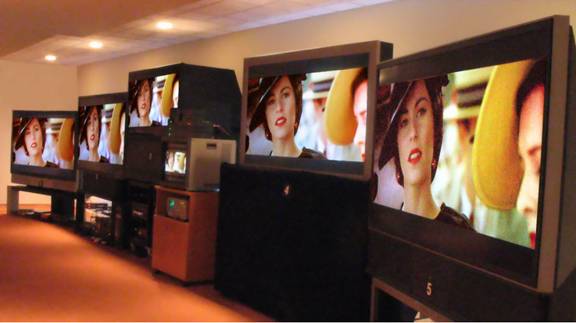
Acknowledgements Over 75 people were involved with the Shoot-Out: about half were participating manufacturers and the other half were Panelists (see Part C) that came to evaluate the HDTVs.
Special Thanks: A number of people made important contributions that warrant a special mention: special thanks to Dr. Edward F. Kelley of the NIST (National Institute of Standards and Technology) for many interesting discussions and for generously sharing his expertise. Special thanks to Dave Migliori for his excellent photography of the Shoot-Out with its difficult lighting layout and viewing angles. Special thanks to Julia Soneira and Lauren Soneira for helping to produce the Shoot-Out, which turned out to be a much larger operation than I had anticipated. And finally, very special thanks to Hope Frank (Brillian), David McDonald (eLCOS), Terry Shea (JVC Consumer) and Rod Sterling (JVC Professional) for the tremendous amount of work that they put in coordinating their company’s efforts, which was crucial for making the Shoot-Out a success.
HDTV Manufacturers: Brillian Corporation: Hope Frank (Vice-President), Chad Goudie, Douglas Gorny, Gil Hazenschprung, Dr. Robert Melcher (Chief Technology Officer), Dr. Matthias Pfeiffer, Jack Waterman. eLCOS Microdisplay Technology: Dr. David J. Cowl, Roland Lue, David McDonald. JDS Uniphase: Michael Newell, Dr. Andrew Taylor. JVC (Consumer Division): Dan McCarron, Terry Shea, Fumi Usuki. JVC Professional Products: Dr. William Bleha, Ken Bylsma, Jack Faiman (Vice-President), Gary Klasmeier, Rod Sterling. SpatiaLight Technologies: Ted Banzhaf (President), Dr. David Hakala (Chief Operating Officer).
About the AuthorDr. Raymond Soneira is President of DisplayMate Technologies Corporation of Amherst, New Hampshire, which produces video calibration, evaluation, and diagnostic products for consumers, technicians, and manufacturers. See www.displaymate.com. He is a research scientist with a career that spans physics, computer science, and television system design. Dr. Soneira obtained his Ph.D. in Theoretical Physics from Princeton University, spent 5 years as a Long-Term Member of the world famous Institute for Advanced Study in Princeton, another 5 years as a Principal Investigator in the Computer Systems Research Laboratory at AT&T Bell Laboratories, and has also designed, tested, and installed color television broadcast equipment for the CBS Television Network Engineering and Development Department. He has authored over 35 research articles in scientific journals in physics and computer science, including Scientific American. If you have any comments or questions about the article, you can contact him at dtso@displaymate.com.
Copyright © 1990-2006 by DisplayMate
Technologies Corporation. All Rights Reserved.
|