|
Consumer and End User Products
The
Consumer and End User Editions
are especially easy to use for both novice and advanced users
and provide expert advice and guidance
for setting up, adjusting, calibrating or just tweaking and tuning-up any
monitor, projector or HDTV to produce the highest possible
image and picture quality.
They're also great for calibrating your color printer
and setting up or adjusting your TV or widescreen HDTV.
Both include an optional Novice Mode that provides additional help and guidance
to help you get started.
Standard End User Edition
Video Edition - an Upgrade for HDTVs, Projectors, and Multimedia Displays
Professional Products
The
Professional Multimedia Editions
are the most advanced and powerful versions of DisplayMate ever,
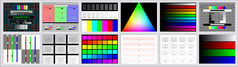
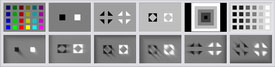
with lots of proprietary highly innovative state-of-the-art suites of
test patterns for precision set up and calibration,
advanced diagnostic testing, evaluation, analysis,
and optimization for every type of display, monitor, projector and HDTV.
They include a
Command Script Processor
for running and producing
fully automated custom test suites, demos and shows.
There are also large sets of test patterns designed for use with
Instrumentation
like Spectroradiometers, Color Analyzers, Photometers,
Waveform Monitors, and Oscilloscopes.
Standard Professional Multimedia Edition
Multimedia Edition Enhanced with Calibration and Test Photos
Multimedia Edition with Motion Test Patterns and Photos
|
Multimedia Edition that Generates Bitmap Files for Mobile Displays and Projectors
|
Video System Hardware Diagnostic Products
These video system hardware
Diagnostic Editions
run under DOS
so that they can directly control the video system hardware
for advanced testing, but you can also launch them from Windows.
They test every aspect of a video system including monitor, video board hardware
and registers, Video BIOS and Video Data Areas.
They are perfect for technical support specialists, system integrators and
test labs.
Basic Diagnostic Edition

|
 DisplayMate for DOS
Product Info
DisplayMate for DOS
Product Info

|
Comprehensive video system hardware diagnostics,
compatibility and performance tests
for all 22 standard PC BIOS Video Modes up through VGA 640 x 480.
|
|
|
Advanced Diagnostic Version
|
DisplayMate Professional for DOS
Product Info
|
Advanced video system hardware diagnostics,
compatibility and performance tests
for 30 PC BIOS Video Modes up through
SuperVGA 1280 x 1024
plus Command Scripts
for running and producing fully automated custom test suites, demos and shows.
|
|
|
|