|

|

|
      
|

Geometric Distortion: Although the geometry of the LCoS devices are perfect, the projection optics generally introduce some distortions due to design or cost limitations. The JVC Professional unit was indistinguishable from perfect (even with its zero overscan) and so it earned an A+, the eLCOS-JDSU unit had some significant keystone distortion near the very bottom of the screen and so it received a B+.
Overscan: Most TVs don’t let you see the outermost 5 percent or so of the image, which was originally introduced in order to allow for aging of the CRT deflection circuits. That’s no longer necessary, but a small amount of overscan (1 percent) is still desirable because of slight timing variations that occur with some HDTV signal sources. Professional units are expected to show 100 percent of the image, so that’s why the JVC Professional unit was set for zero overscan. It can be adjusted to provide some overscan if desired. The JVC Consumer Unit had considerably more overscan than necessary.
Screen Uniformity: All projectors have an inherent tendency to be brightest at the center and dimmer in the corners. The effect was more noticeable in the JVC Consumer unit, where the luminance in the extreme corners was 50 percent of the center value. This actually wasn’t as visually noticeable as you might think because of the way the eye processes images. The much smaller intensity variations in the other units were not noticeable. However, there can be slight variations between the red, green and blue channel LCoS panels, which can introduce slight color and gray-scale variations across the screen. Most of these units include some screen uniformity correction tables that are calibrated at the factory. It was not yet implemented in the eLCOS-JDSU unit and was slightly out of calibration on the Brillian 1080 prototype, but was virtually perfect on the Brillian 720 and JVC Professional units. These correction tables are very impressive: the Brillian and JVC Professional units can divide the screen into thousands of cells and correct for differences in intensity, color and Gamma between cells. Neither of them, however, implement a correction for the intensity fall-off in the corners of the screen. This would require a sacrifice in peak brightness at the center of the screen, which in my opinion is a fine trade-off in view of the earlier discussions. This is yet another example of how peak brightness can be traded for improved picture quality.
Gray-Scale Irregularities: It’s very important for a display to have a very smooth gray-scale so as not to produce false intensity contours in an image. All of the units with internal 12-bit Gamma tables should be able to accurately reproduce the input 8-bit signals provided all 256 levels are accurately measured and calibrated at the factory. The JVC Professional unit had a perfectly smooth gray-scale that was indistinguishable from that of a CRT, the ultimate comparison test, so it received a grade of A+. The eLCOS and both Brillian units had small gray-scale irregularities, but they were none-the-less much better than most displays using other technologies and they received grades of A-. Since these were all prototypes I would expect the production units to be even better. The JVC Consumer unit showed considerably more gray-scale irregularities and false contouring and received a grade of C.
During the Jury Panel viewing tests quite a few panelists noticed that the blue wallpaper in the Windows Media Center Edition was actually a continuously moving background image with subtle variations in intensity, which made it an excellent indicator of false contouring and gray-scale irregularities. I’m sure that wasn’t Microsoft’s intention but it’s an excellent test pattern. Note that the image has a small amount of contouring built-in, so you need a CRT for a reference.
Gray-Scale Noise: Because the LCoS gray-scale is produced by an analog Liquid Crystal response (Part A) I did not expect to see the dithering noise that is present on DLP and Plasma displays, which is generally noticeable at the dark end of the gray-scale. And I didn’t, even on the eLCOS-JDSU and JVC Consumer units, which use digital Pulse Width Modulation to generate the gray-scale. This is very impressive and imparts a very smooth CRT-like gray-scale to the LCoS HDTVs.
Focus and Convergence: The sharpness of the image depends on the focus of the individual the red, green and blue channels and also their registration, which is referred to as convergence. Most of the units had excellent convergence, with a peak error of about one-third of a pixel in some areas of the screen. The JVC Consumer unit had a peak misconvergence error of one pixel in some areas.
Fine Detail Artifacts: Since I was feeding the units perfect digital test signals and they all use digital signal processing throughout I was expecting near perfect performance in all of these tests. I expected to have perfect control over every single individual pixel on the screen, and also with every combination of pixels that I constructed. I was not disappointed, except by the JVC Consumer unit. But let’s start with the good news first: the eLCOS-JDSU unit was absolutely flawless in every test. I gave it an A+, which is a 98, but it deserves a perfect 100. The reason is the fully digital backplane (Part A): for example, it got a perfect 100 on DisplayMate’s very sensitive Video Bandwidth Index test. The other units, which have analog backplanes got slightly less than perfect in this and related tests - they all got pure As, which is still an outstanding grade.
The JVC Consumer unit was a different story. When I fed the unit native mode 1280×720 black and white test patterns I saw moiré interference patterns (in both the vertical and horizontal directions), which is generally an indication of scaling artifacts. When I switched from black and white to colored test patterns the images broke up severely. For example, non-horizontal colored lines were reproduced as dashed lines with segments alternating between color and gray. Colored text was unreadable. Any fine detail content in red and blue was missing half of the pixels. Periodic pure green fine detail produced what appeared to be a full-spectrum of on-screen colors. I finally realized that the unit was converting the 4:4:4 DVI RGB into 4:2:2 YCbCr and then reconverting it back to RGB. There was no appropriate filtering so colored content drawn in even pixel columns was correctly reproduced but content drawn in the odd pixel columns was reproduced as gray (with its Luma value). If an odd pixel was surrounded by colored even pixels it would get an interpolated value of their color. Periodic full resolution vertical black and white lines were reproduced as solid gray, indicating significant low pass filtering, which softens the images. However, there was also a significant amount of edge enhancement to give the feeling of a sharp image. These are very severe artifacts. I gave the unit a D. The visual picture quality from ordinary video was surprisingly good given the above discussion, so there was a significant amount of visual tweaking built-in to the unit’s engineering. We’ll discuss this further below. Hopefully the new generation of JVC Consumer units will take a different approach and correct these problems.
Motion Smear: All of the LCoS panels have reasonably fast response times so I did not expect to see much on-screen smearing with moving test patterns or moving video – and I didn’t. Although response time specifications are for black to peak white and then the reverse, the medium intensity gray-to-gray transitions are often much slower. The DisplayMate test patterns use continuous intensity ramps to examine all of the gray-to-gray transitions and very little on-screen smearing was seen. The JVC Consumer unit had the best performance and I gave it an A, while all of the other units received an A-.
Viewing Tests After the test pattern analysis it was time to see how good photographic images and normal video looked. Test patterns are designed uncover subtle image quality issues so they always provide a much more severe view of display performance. All of the artifacts seen with the test patterns also exist in normal video source material, they’re just not as concentrated nor as obvious because such images normally have a very complex structure that tends to obscure the artifacts.
In addition to the standard Jury Panel evaluation program discussed below, we also looked at many ATSC High Definition broadcast television shows, a number of digital D-VHS High Definition recordings, half a dozen IMAX Windows Media Video High Definition 1080 movies, and half a dozen or so (Standard Definition) DVDs. Many of the prototype units were not yet HDCP (High-bandwidth Digital Content Protection) compliant, so we actually looked at very little encrypted D-Theater movie material. Finally, I used a large selection of still photographs from the InfoComm Projection Shoot-Out CDs and DVDs from the 1996 to 2002 editions (which include a selected set of DisplayMate test patterns).
In order to evaluate how well these HDTVs can perform as high quality large-screen living room PC monitors, I spent quite a bit of time browsing the web with them and even wrote a portion of this article using each of them in turn as my display. I set the computer to the lowest HDTV native mode of 1280×720. At 1920×1080 almost everything comes out looking way too small. It takes a fair amount of effort to make all of the fonts and graphics come out looking right, and many applications simply aren't capable of properly rescaling their internal elements. But at 1280×720 things looked beautiful, similar to a widescreen version of 1024×768, which all applications generally handle quite well. The large 65 inch Brillian 720 set was outstanding as a giant PC monitor, but the 1080 units also looked really good using Silicon Optix video processors to do the necessary high quality rescaling. The Brillian set demonstrated how fabulous and functional a PC in the living room can be – the Holy Grail of convergence is finally a reality.
There were just two troubling issues that needed attention: first many PC applications operate with a peak white background, so the excessive brightness issue (that was discussed in Part B) was even more disturbing than with video, which generally operates at low Average Picture Levels. Another great reason for an iris control! The second problem was dealing with the slight overscan, which cuts off some menus and buttons. As far as I can tell none of the major video graphics board manufacturers make a driver with a proper overscan control to correct this issue for all of the modes and signal outputs. (The scan timing must remain unchanged, so for PC applications the video drivers need to introduce non-functional black pixels into the overscan region by reducing the screen resolution below 1280×720 by the appropriate amount so that everything actually appears on screen.) In fact, the display drivers supplied by the board manufacturers are mostly a confusing kludge of controls. Microsoft needs to implement a very simple and cleanly layered video driver interface if it wants the PC welcomed into every living room.
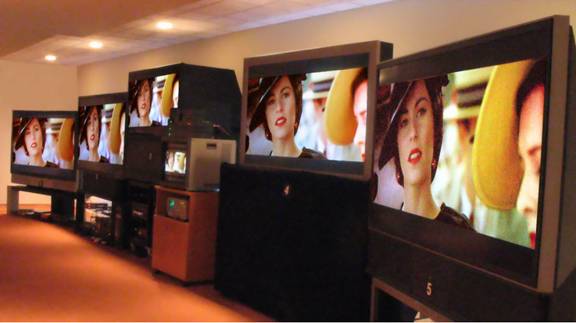
Jury Panel Evaluations Since we had all of these great HDTVs and lots of fabulous high quality source material to show on them I decided to turn all of the hard work (mine and the manufacturers) into some fun, so my wife Julia and I threw a series of HDTV parties where friends and colleagues were invited to watch and then grade each of the units on image and picture quality. We had a total of 34 people come to view a roughly one hour presentation that I had assembled. Most people liked it so much they stayed much longer to watch most, and in some cases all of the shows and movie clips that we had. Some came by more than once. The group sizes were intentionally small and ranged from two to six people at a time. This allowed everyone to spend a fair amount of time directly in front of each unit.
I intentionally chose a broad audience. About half of the people had home theaters or professional audio-video experience, the others were from professional-level families that had standard definition CRT TVs. To look for trends and examine consistencies I divided the panelists into six groups – each group wound up with either five or six people. The Students were all High School Juniors up through College Seniors, ages 16 to 21. The Home Theater group consisted of panelists that weren’t part of the AV Pro or Video Expert groups that had a home theater (with a High Definition CRT, LCD, Plasma or DLP display). The remaining consumer panelists were divided into Technical and Non-Technical, based on their occupations. The AV Professional group consisted of installers, dealers and manufacturers reps. The Video Expert group consisted of a carefully selected group of panelists with a considerable amount of expertise in video picture quality. Included were Chris Chinnock, the publisher of Insight Media (Projection Monthly, Microdisplay Report, MDTV-Retailer, and Display Watch), one engineer and one executive from WMUR-TV (Jim Breen and Paul Falco), two professional HDTV salespeople that I know have a great eye for picture quality (Ken Connors and Todd Whorton), and a store manager from a specialty AV chain (Steven Lopez). All of the Panelists are listed in the Acknowledgement section.
The program consisted of four segments: the first was a (Standard Definition) clip from the DVD Seabiscuit (chapter 7, which has a lot of great close-ups and colorful outdoor scenes) played on Denon’s flagship DVD-5910 player, then a digital D-VHS 1080i recording of Smart Travels with Rudy Maxa on Florence Italy (a very clean and high quality 1080i source with lots of fine detail, great cinematography and content that maintained everyone’s attention). Next came a digital D-VHS 1080i recording of The Tonight Show with Jay Leno, which has one the best HD productions and sets. I chose a segment where Jay pokes fun at bunch of consumer products using close-up shots of each. It was amazing how you could read the fine print and UPC codes on the products. You could also see the scratches on the Jay’s desk. Many of the women zeroed in on Jay’s manicure, where you could easily see irregular cuticles, hang nails and cracks and breaks in his fingernails. Clearly he had been working on his bike recently. HD can be brutal with its clarity and this segment let people compare fine details in the images. Note that Smart Travels and The Tonight Show were recorded directly from Over the Air broadcasts because both satellite and cable TV feeds apply additional compression that degrades the picture quality.
The last segment consisted of a series of HD movie clips encoded in Windows Media 9 Series and provided by the Microsoft Digital Media Division (see the Sidebar). The Windows Media Video HD codec is a mandatory codec for both the HD-DVD and Blu-Ray Disc consortiums and provided a taste of what the next generation of pre-recorded material will be like. One major downside for me was that after being immersed in all of this high quality HD material, DVDs now look like something akin to VHS. The Windows Media Video HD material was all of very high quality, was free of annoying Mosquito Noise that generally accompanies MPEG, and was the hit of the Shoot-Out. Many people commented that the Windows Media movie clips looked better on these HDTVs than they did in the movie theaters. Most asked to see many more than the standard set of clips that I had selected. Some stayed for two hours or more. Everyone genuinely had a great time and it was thrilling to see people so enthralled with display technology.
I intentionally provided as little guidance and information to the panelists as possible in order to keep the opinions as unbiased and original as possible. The only ground rules that I established were that the grading was to be based solely on picture quality and that screen size, brightness and styling were not to be factors in the grading. Shoot-Outs present the greatest of all challenges for a display because individual sets that may look fabulous when viewed all by themselves will generally look no where near as good when surrounded by many other great displays showing the same high quality content. I explained that the source material was of very high quality but that some image defects were due to the source material. To decide if it was the source or the display, compare several displays – if it’s in all of them the origin is in the source material, otherwise it’s the display. Note that in order to eliminate the differences in front-end signal processing between the units we had dual 720p and 1080p digital signal feeds produced by prototype Silicon Optix video processors that were equipped with advanced 1080i motion adaptive deinterlacing. See Part B for information on the all-digital signal distribution system.
The units were graded on a school-like A to F system. To establish a base grading scale, the best sets in a retail store would get a B-, so if a unit was better than the best retail HDTVs it should get a B or better and a C+ or lower if it was worse. Most of the Jury Panelists were blown away with the picture quality they were experiencing. Many were initially overwhelmed and said the units were all too good to tell apart, but after about twenty minutes of watching and comparing the units everyone was able to clearly see picture quality differences between them (without my guidance). By the end of the program almost everyone had developed strong opinions. The tabulated results of the Jury Panel Evaluations are shown in Table 2.
Table 2 : Jury Panel Evaluations
The results are all amazingly consistent with several very interesting trends. First, the AV Pros were the lowest graders but the Video Experts were (surprisingly) the highest. The JVC Consumer unit scored highest with the consumer panelists and lowest with the Video Expert panelists (we’ll explain why, below). The Brillian 720 scored highest with the Home Theater and Video Expert panelists. The JVC Professional unit consistently received the highest grades in spite of the fact that it was the smallest and dimmest of the units, while the Brillian 1080 and eLCOS-JDSU units were both fairly consistent with A- from most of the panels.
All of the units were graded on the same scale, so the 720 units were expected to score lower than the 1080 units because they have roughly half the number of pixels and therefore the images should appear a bit fuzzier, and they did. Note that I did not tell the panelists which units were which, and most of the non-professional panelists were unaware of the distinction. We’ll discuss the Jury Panel comments further under the individual unit assessments, below.
I spent some time trying to understand why the consumer panelists rated the JVC Consumer unit so highly. It had the lowest objective on-screen resolution of all of the units due to internal signal processing (see Fine Detail Artifacts, above), but a number of consumer panelists commented on how sharp it looked. It turns out that the copious artifacts and significant edge enhancement produced so much artificial texture in the image (more than any of the other units) that some panelists interpreted it as an indication of the set’s superior sharpness. All of the Video Experts recognized this effect, and it’s the primary reason why they gave this unit the lowest score of the Shoot-Out. One possible explanation for the consumer ratings is that JVC is simply giving consumers exactly what they think they want.
Display Assessments The assessments for each unit include summaries and highlights of the major issues that have been discussed in Parts A to C. Please refer back to the appropriate article for details, definitions, discussions and background information. Each assessment includes Product Details, Measurements, Feature Highlights, a selection of representative Jury Comments, test pattern and panelist Grading assessments, the author's own Overall Assessment and Commentary. In the Grading assessments, Advanced Panelists refers to the mean grade assigned by the Home Theater, AV Professional and Video Expert panels. The author's own Overall Assessment, is, not surprisingly, often closest to the Video Experts grade. It includes a discretionary boost that estimates the performance of each unit with the prototype kinks ironed out, so it’s sometimes higher than the other grades.
Brillian 720 Assessment ● Product Details: Model 6501m, 1280×720 native resolution, 65 inch screen, price $5,999. ● Measurements: Black-Level 0.24 cd/m2, Peak Brightness 449 cd/m2, Contrast Ratio 1,870, Gamma 2.13, 4x4 Checkerboard Contrast 162. ● Feature Highlights: excellent On Screen Menus provide extensive user and service controls, great for tweaking and calibration. Outstanding manual, great for videophiles. Extensive AV inputs, DVI but no HDMI. ● Jury Comments: Best 720p TV I have seen [identical quotes from two Expert panelists]. Sharp, vivid and crisp for a 720p. Crisp text and true color throughout. Good color accuracy. Black levels were quite good. ● Grading: Test Patterns A-, Advanced Panelists B+, Video Experts A- ● Overall Assessment: A- (as a production unit) ● Commentary: This unit is on par with the 1080 units except the calibrated Contrast Ratio was only 1,870, which still makes it an outstanding performer and definitely one of the very best rear projection HDTVs available. It also makes an outstanding giant screen PC monitor for the living room. We have given this model the DisplayMate Best Video Hardware Guide Award and Trophy for the “Very Best Combination Large Screen HDTV and Computer Monitor.”
JVC Consumer 720 Assessment● Product Details: Model HD-61Z886, 1280×720 native resolution, 61 inch screen, price $2,695-$4,699. ● Measurements: Black-Level 0.59 cd/m2, Peak Brightness 552 cd/m2, Contrast Ratio 936, Gamma 2.06, Checkerboard Contrast 107. ● Feature Highlights: The only unit with an ATSC HD Tuner. Has HDMI and dual IEEE 1394 Firewire inputs. Has “Motion Adaptive Dynamic Gamma” (not exactly sure what this means, most likely just marketing puffery), that changes the Gamma Curve based on picture content, “Smart Picture,” which adjusts the picture contrast based on the Average Picture Level, and “Color Management,” which modifies the picture’s colors. The set performed best with all of these “advanced” features turned off. ● Jury Comments: Much better off axis. Color speckle on the screen. Obvious banding. Massive and tragic artifacts. Obvious artifacts add illusion of texture but lacks sharpness. Details appeared sharpest on this set. ● Grades: Test Patterns B-, Advanced Panelists B, Video Experts B- ● Overall Assessment: B (LCoS Technology without the front-end electronics) ● Commentary: It’s unfortunate that the severe artifacts from the front-end signal processing for this set significantly degraded its otherwise fine performance. It was the only production unit in the Shoot-Out and its $2,695 price for a 61 inch HDTV would have made it an outstanding value. Hopefully the new generation of D-ILA sets will correct this problem.
Brillian 1080 Assessment● Product Details: Model 6580i, 1920×1080 native resolution, 65 inch screen, price $7,999. ● Measurements: Black-Level 0.12 cd/m2, Peak Brightness 457-509 cd/m2, Contrast Ratio 3,807-4,239, Gamma 2.18, Checkerboard Contrast 204. ● Feature Highlights: excellent On Screen Menus provide extensive user and service controls, great for tweaking and calibration. Outstanding manual, great for videophiles. Extensive AV inputs, DVI but no HDMI. ● Jury Comments: Great detail. Good shadow detail. Great looking picture. Crisp, limited artifacts, very watchable. 1080i material looked realistic. Black levels are good. Screen on this display adds unnecessary grain to the image. ● Grades: Test Patterns A-, Advanced Panelists A-, Video Experts A- ● Overall Assessment: A (as a production unit) ● Commentary: This is essentially an enhanced version of Brillian’s 720 unit with an improved Light Engine, electronics and 1080 devices. It has the same advanced front-end controls as the 720 unit. It performed extremely well for an early prototype. Production units should be even more impressive.
eLCOS-JDSU 1080 Assessment ● Product Details: Model Demonstrator, 1920×1080 native resolution, 56 inch screen, price NA. ● Measurements: Black-Level 0.20 cd/m2, Peak Brightness 885 cd/m2, Contrast Ratio 4425, Gamma 2.18, Checkerboard Contrast 202. ● Feature Highlights: this unit was a technology demonstrator produced by a consortium of four companies. The DNP screen, with a gain of 4, was outstanding, very sharp with no speckle. Silicon Optix provided the excellent front-end signal processing with a prototype Niobe Reference Design HQV board that provides 1080i motion adaptive deinterlacing. ● Jury Comments: Terrific blacks, ultra crisp text and detail. No noise. Very clear. Very good detail and accuracy. Second best [compared to JVC Professional] for overall color and detail. I believe I developed a slight tan while viewing this set. ● Grades: Test Patterns A-, Advanced Panelists A-, Video Experts A- ● Overall Assessment: A (as a production unit) ● Commentary: It’s surprising that a unit this good isn’t even a prototype, and it’s not even expected to enter the US market until sometime in 2006. A number of panelists wanted to know how to buy one and were shocked that it wasn’t going to be possible anytime soon. The only major complaint is that it was excessively bright, but that is relatively easy to fix by going to a larger screen with a lower gain.
JVC Professional 1080 Assessment● Product Details: Model DLA-HRM1, 1920×1080 native resolution, 48 inch screen, price $44,995. ● Measurements: Black-Level 0.11 cd/m2, Peak Brightness 234 cd/m2, Contrast ratio 2,132, Gamma 2.19, Checkerboard Contrast 63. ● Feature Highlights: This is a high-end professional studio reference monitor. Includes a low 1.25 gain screen made of glass rather than plastic, and a Silicon Optix based HQV front-end signal processor that provides 1080i motion adaptive deinterlacing. Very accurate geometry with no visible geometric distortion. ● Jury Comments: Gorgeous image. Clarity and crispness are very impressive. Vivid, great depth, very crisp and clean. Smooth picture, not as much punch as the other sets. Closest I've seen to actually looking out a window. Felt I could stick my head in and look left and right. Easiest display on the eyes. Easiest to watch. Best overall, please bring to my house. ● Grades: Test Patterns A, Advanced Panelists A, Video Experts A+ ● Overall Assessment: A+ (as a production unit) ● Commentary: This is an outstanding High Definition monitor designed (and priced) for high-end professional users in television and movie post-production studios. It’s virtually artifact free and has very accurate colors, gray-scale and geometry. We consider it as the new Reference Standard monitor. It out-performs a comparably priced professional CRT studio monitor (Part D).
What’s Coming Next In Part D we’ll have an overall Assessment of LCoS technology, followed by detailed technical performance comparisons between all of the major display technologies: CRT, LCD, Plasma, DLP, and LCoS, and we’ll finish with a discussion of the most exciting new developments in display technology that will be the subject of future articles in this series.
Article Links Part A: Introduction to LCoS Technology Part B: LCoS Color and Gray-Scale Accuracy Part C: Test Pattern and Jury Panel Evaluations Part D: Comparison with CRT, LCD, Plasma and DLP
Sidebar: LCoS HDTV Manufacturers Sidebar: Shoot-Out Hardware and Software
Acknowledgements Over 75 people were involved with the Shoot-Out: about half were participating manufacturers and the other half were Jury Panelists that came to evaluate the HDTVs.
Special Thanks: A number of people made important contributions that warrant a special mention: special thanks to Dr. Edward F. Kelley of the NIST (National Institute of Standards and Technology) for many interesting discussions and for generously sharing his expertise. Special thanks to Dave Migliori for his excellent photography of the Shoot-Out with its difficult lighting layout and viewing angles. Special thanks to Stacey Spears for selecting and assembling the Windows Media Video program material. Special thanks to Julia Soneira and Lauren Soneira for helping to produce the Shoot-Out, which turned out to be a much larger operation than I had anticipated. Special thanks to Ken Connors and Todd Whorton for coming by to evaluate HDTVs late at night after a long day of selling HDTVs. And special thanks to Tom Griffith, news anchor of WMUR-TV, for his help with recruiting and coordinating the WMUR panelists. And finally, very special thanks to Hope Frank (Brillian), David McDonald (eLCOS), Terry Shea (JVC Consumer) and Rod Sterling (JVC Professional) for the tremendous amount of work that they put in coordinating their company’s efforts, which was crucial for making the Shoot-Out a success.
Panelists: John Bomba, Linda Bomba, Nicole Bomba, George Claborn, Judy Claborn, Jason Edwards, Dr. Kenneth Edwards, Petra Clark, Ron Clark, Sabrina Clark, Carol Fortin, Megan Hinners, Carol Lewis, Dan Ligett, John Lobsitz Jr, Dave Migliori, Cindy Migliori, Kristy Migliori, Scott Migliori, Dr. Larry Puccini, Marty Rowley, Maria Rowley, Susan Stefanec. AV Professional Panelists: Tom Lewis, Eric Pikcilingis, Lori Pikcilingis, Mike Soucy, Craig Theberge. Video Expert Panelists: Jim Breen (WMUR-TV), Chris Chinnock (Insight Media), Ken Connors, Paul Falco (WMUR-TV), Steven Lopez (Cambridge SoundWorks), Todd Whorton.
HDTV Manufacturers: Brillian Corporation: Hope Frank (Vice-President), Chad Goudie, Douglas Gorny, Gil Hazenschprung, Dr. Robert Melcher (Chief Technology Officer), Dr. Matthias Pfeiffer, Jack Waterman. eLCOS Microdisplay Technology: Dr. David J. Cowl, Roland Lue, David McDonald. JDS Uniphase: Michael Newell, Dr. Andrew Taylor. JVC (Consumer Division): Dan McCarron, Terry Shea, Fumi Usuki. JVC Professional Products: Dr. William Bleha, Ken Bylsma, Jack Faiman (Vice-President), Gary Klasmeier, Rod Sterling. SpatiaLight Technologies: Ted Banzhaf (President), Dr. David Hakala (Chief Operating Officer).
Equipment Manufacturers: Anchor Bay Technologies: Gary Chappell, Adam Damico. Gefen: Hagai Gefen (President), Linda Morgan, Khasha Roholahi. CinemaQuest: Alan Brown (President). Konica Minolta Instrument Systems Division: Tom Kwon and Maria Repici. Microsoft Windows Digital Media Division: Amir Majidimehr (Vice President), Stacey Spears, Kevin Unangst. Silicon Optix: Gary Chin, Ney Christensen, Dennis Crespo, Darren Gnanapragasam, Justin Lam, Gopal Ramachandran, Derek Yuen.
About the AuthorDr. Raymond Soneira is President of DisplayMate Technologies Corporation of Amherst, New Hampshire, which produces video calibration, evaluation, and diagnostic products for consumers, technicians, and manufacturers. See www.displaymate.com. He is a research scientist with a career that spans physics, computer science, and television system design. Dr. Soneira obtained his Ph.D. in Theoretical Physics from Princeton University, spent 5 years as a Long-Term Member of the world famous Institute for Advanced Study in Princeton, another 5 years as a Principal Investigator in the Computer Systems Research Laboratory at AT&T Bell Laboratories, and has also designed, tested, and installed color television broadcast equipment for the CBS Television Network Engineering and Development Department. He has authored over 35 research articles in scientific journals in physics and computer science, including Scientific American. If you have any comments or questions about the article, you can contact him at dtso.info@displaymate.com.
Copyright © 1990-2006 by DisplayMate
Technologies Corporation. All Rights Reserved.
|