|

|
DisplayMate Multimedia Edition
is the most advanced and powerful version of DisplayMate ever,
with lots of proprietary and highly innovative suites of test patterns for
setting up, tuning-up, calibrating, testing,
evaluating, diagnosing, and analyzing
CRTs, analog and digital LCD, Plasma, DLP, LCoS, and SXRD
monitors and projectors, microdisplays, video boards, color printers,
TVs and HDTVs, NTSC/PAL Television encoders and decoders, and more.
|
And unlike all other setup, calibration and test products,
DisplayMate automatically runs
at the true native resolution of any display, projector or HDTV,
even for non-standard resolutions like 1366 x 768.
In fact, the Multimedia Edition will run at
ANY Resolution up through 4100 x 4100
including full Digital Cinema at 4096 x 2160.
There are no preset Resolutions and Aspect Ratios or
test patterns reconstituted from fixed stored bitmaps.
DisplayMate is the only product that uses advanced state-of-the-art
scale-free mathematical equations to generate the test patterns real-time
for your exact display so they are extremely precise and accurate.
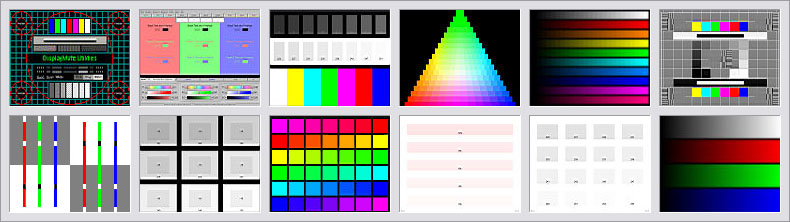
A Small Sample of Color and Gray Scale Test Patterns from the DisplayMate Multimedia Edition
The Multimedia Edition supports digital DVI and HDMI
in addition to analog VGA, Component Video, S-Video and Composite Video.
Connect to almost any monitor, projector or HDTV.
There are many sets of test patterns designed for use with
Instrumentation
like Spectroradiometers, Color Analyzers, Colorimeters, Photometers,
Waveform Monitors, and Oscilloscopes.
Plus there is a
Command Script Processor
for running and producing
fully automated custom test suites, demos and shows.
The Multimedia Edition is the product now used by most computer
and video magazines for Editorial Testing and Lab Reviews of video hardware.
Run DisplayMate from your Laptop and you have a World Class inexpensive portable digital display laboratory.
Don't spend thousands of dollars for test signal generators that have a small
set of outdated 30-year old generic test patterns,
when DisplayMate offers a much larger and more powerful set of innovative and
proprietary test patterns, and costs substantially less.
Virtually all of the latest digital HDTVs, monitors, and projectors now
connect automatically to any Windows 7, Vista or XP PC with DVI or HDMI outputs,
so you can use DisplayMate to work on any digital display or
digital HDTV technology.
Read these Outstanding Reviews of DisplayMate from Top Publications
- Over 300 advanced test patterns plus 200 additional test pattern variations,
for a total of 500+ test patterns.
Each test pattern comes with a detailed "Description" plus a
"What To Look For" section that describes issues and artifacts
to search for in the image.
- A Command Script processor for running and producing
fully automated custom test suites, demos and shows. See below for details.
- Many sets of test patterns are designed for use with Instrumentation like
Spectroradiometers, Color Analyzers, Photometers,
Waveform Monitors, and Oscilloscopes.
- An Aspect Ratio control can automatically generate a complete set of
Anamorphic test patterns for any video mode with Aspect Ratios
from 0.5 to 3.3, including 4:3 into 16:9.
- DisplayMate supports all Resolutions up through 4100 x 4100
and all Aspect Ratios from 0.5 to 3.3 including HDTV and CinemaScope.
This includes portrait(3:4), square(1:1), 1.25, 1.33(4:3), 1.66,
1.75, 1.78(16:9 HDTV), 1.85, 2.05, 2.35 and 2.55, and any other value
between 0.5 and 3.3.
Note that there are no predefined resolutions or geometries so any
resolution and aspect ratio is possible because
all DisplayMate test patterns are generated real-time from
scale-free mathematical equations.
- The Multimedia Edition comes with comprehensive electronic
documentation including custom Test Information Screens for each test pattern,
an extensive and detailed Windows Help for DisplayMate,
a Script Reference Manual,
10 sample Scripts, and a ReadMe Documentation and Information File.
 Click here for Sample DisplayMate Screen Shots

|
To use DisplayMate to calibrate your HDTV you'll need to
connect it to a Windows PC. Fortunately, that's now pretty easy.
Once you do this your HDTV will show your Windows Desktop and
can then function as a giant PC Monitor
so you can watch all of your applications on the HDTV.
Click here for information on calibrating your HDTV with DisplayMate
|
Now available as an Enhanced Multimedia Edition on a Portable DisplayMate USB Drive
 Available on a DisplayMate USB Drive or CD:
Price is for Quantity 1. Click the Order Button to see the Discounts for Quantity 2 or more.
Price on CD is $495

Price on a Portable DisplayMate USB Drive is $495
- User defined Command Scripts allow you to customize, completely control, and
even fully automate the Multimedia Edition.
- An Automatic Program Mode makes it a snap to create your own Scripts.
All you have to do is give the Script a name and select which
tests, variations, colors and fonts you want to use.
Activate a timer and the test patterns will automatically sequence and repeat.
- A unique feature is that you can still interactively control
DisplayMate, even while a Script is running, so when you see something
interesting you can explore it in detail.
You can easily reverse the Script or run tests, colors and variations
that are not part of the Script.
- A rich set of 40 Script Commands are provided to give you complete and
versatile control. A detailed online manual with examples is provided.
- Ten sample Command Scripts are included:
three are tutorials to help you write your own scripts,
and seven are custom test-suites for testing CRTs, analog and digital LCD
monitors and projectors, plasma displays, video boards, color printers,
TVs and HDTVs, and NTSC/PAL Television encoders and decoders.
|
Hardware and Operating Systems
|
- The Multimedia Edition supports all resolutions
up through 4100 x 4100,
all screen shapes and aspect ratios including landscape, portrait,
and HDTV 16:9, up to a super-wide maximum of 3.3,
and all color modes from monochrome up through full 24-bit or 32-bit color.
- DisplayMate runs on any video board and monitor supported by Windows.
Automatically configures itself to run under all 32-bit versions of
Windows 7, Vista, XP, Windows'95/98/Me, and Windows NT/2000.
- DisplayMate runs on all 32-bit versions of Windows 7, Vista and XP.
DisplayMate runs in
XP Mode
on 64-bit Windows 7 systems.
- DisplayMate runs on Apple, Linux, and Unix workstations using these
Emulators
|
Sample Screen Shots and List of Test and Calibration Patterns
|
|
Order Online or by Phone
|

|
Shipped anywhere Worldwide
|
|
|