|
|
DisplayMate for Windows Features
State-of-the-Art Video Display Utilities Designed for End Users
For all 32-bit versions of Windows 7, Vista, and XP
and XP Mode on 64-bit Windows 7
|
|
DisplayMate for Windows
is the consumer version of our
highly acclaimed video utility for setting up, tuning up, calibrating,
evaluating, and testing any CRT, LCD, or Plasma monitor, projector or HDTV
to produce the highest image and picture quality possible.
It's also great for calibrating your color printer to match your display.
DisplayMate is easy to use, assumes no prior video knowledge, and is
designed for both video novices and experts alike.
You simply look at the test patterns, which are presented like a slide show,
and adjust the controls by following the on-screen instructions.
|

A Small Subset of Color and Gray Scale Test Patterns from DisplayMate for Windows
- DisplayMate works by automatically showing you a slide show of specialized
test pattern images.
Novice, Express, Standard, and Complete Programs allow you to configure the
program according to your needs and interests.
Read these Outstanding Reviews of DisplayMate from Top Publications
- If you are a Novice user DisplayMate has an optional Novice Mode with a
special set of light and simplified instructions and patterns.
- Most DisplayMate test patterns are designed for visual evaluation
and adjustments by eye, but there are also some optional test patterns for
use with instruments like color analyzers, colorimeters, spectroradiometers,
and waveform monitors if you have access to them.
- Special suites of test patterns for
setting up, calibrating, adjusting, tuning up, testing and
evaluating, CRT, LCD, Plasma and Flat Panel monitors, projectors and HDTVs.
- Over 110 test patterns are generated for ANY Screen Resolution and Aspect Ratio.
Most of the time you will need only a small number, but the large library
of test patterns will help you deal with any display issue or problem
that may arise.
- DisplayMate for Windows supports digital DVI and HDMI
in addition to analog VGA, Component Video, S-Video and Composite Video.
Connect to almost any monitor, projector or HDTV.
-
 Click here for Sample DisplayMate Screen Shots
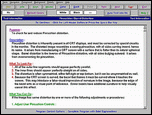
- Each test pattern comes with a detailed "Description" that explains
"What To Look For" and
includes detailed step-by-step instructions on
"What You Can Do"
to improve the image and picture quality.
You simply view them one at a time and follow the easy
step-by-step on-screen instructions, expert advice and guidance
that accompanies each test pattern, as shown on the right.
- DisplayMate supports All Resolutions up through 2048 x 2048
because it uses advanced scale free mathematical equations.
Note that there are no predefined resolutions, aspect ratios,
or screens geometries so DisplayMate
will run at the true native resolution of your monitor, projector or HDTV.
Other products use a single "one size fits all" predefined screen resolution.
- DisplayMate for Windows comes with comprehensive electronic
documentation including custom Test Information Screens for each test pattern,
an extensive and detailed Windows Help for DisplayMate,
and a ReadMe Documentation and Information File.

|
To use DisplayMate to calibrate your HDTV you'll need to
connect it to a Windows PC. Fortunately, that's now pretty easy.
Once you do this your HDTV will show your Windows Desktop and
can then function as a giant PC Monitor
so you can watch all of your applications on the HDTV.
|
Click here for information on calibrating your HDTV with DisplayMate

|
To calibrate your printer you first calibrate your monitor with DisplayMate.
Then you print the same DisplayMate test patterns
and match them to the monitor by using the print driver controls.
|
Click here for information on calibrating your printer with DisplayMate
New! Now available as an Enhanced Edition on a Portable DisplayMate USB Drive
 Available on CD, USB Drive, via Email Attachment, and by Internet Download
Price is for Quantity 1. Click the Order Button to see the Discounts for Quantity 2 or more.
Price on CD is $79

Price on a Portable DisplayMate USB Drive is $79
Price for electronic delivery via Email Attachment $69
Price for immediate electronic delivery via Automatic Web Download is $69
|
Expert Help and Information
|
- A built-in Expert System and internal data base provide
detailed instructions and expert advice, custom generated for your system.
Each test screen comes with a detailed description that explains
What To Look For and
includes detailed step-by-step instructions on
What You Can Do
to improve the appearance of the image.
- The built-in electronic Manual includes chapters on:
the functions of all monitor and video board controls;
Windows Video System Parameters;
Color Models and Color Matching;
Gray-Scale Linearity;
Gamma Corrections, and Transfer Functions;
and how to extend the life of your display.
|
Hardware and Operating Systems
|
- DisplayMate for Windows on USB
supports all resolutions up through 2600 x 2600
(non-USB versions 2048 x 2048),
all screen shapes and aspect ratios from 0.75 to 2.0,
including landscape, portrait, and HDTV 16:9,
and all color modes from monochrome up through full 24-bit or 32-bit color.
- DisplayMate runs on any video board and monitor supported by Windows.
Automatically configures itself to run under all 32-bit versions of
Windows 7, Vista, XP, Windows'95/98/Me, and Windows NT/2000.
- DisplayMate runs on all 32-bit versions of Windows 7, Vista and XP.
DisplayMate runs in
XP Mode
on 64-bit Windows 7 systems.
- DisplayMate runs on Apple, Linux, and Unix workstations using these
Emulators
|
Sample Screen Shots and List of Test and Calibration Patterns
|
|
Order Online or by Phone
|

|
Shipped or Internet Delivery
|
|
|
|